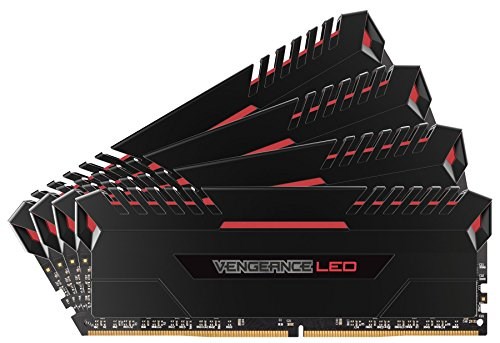
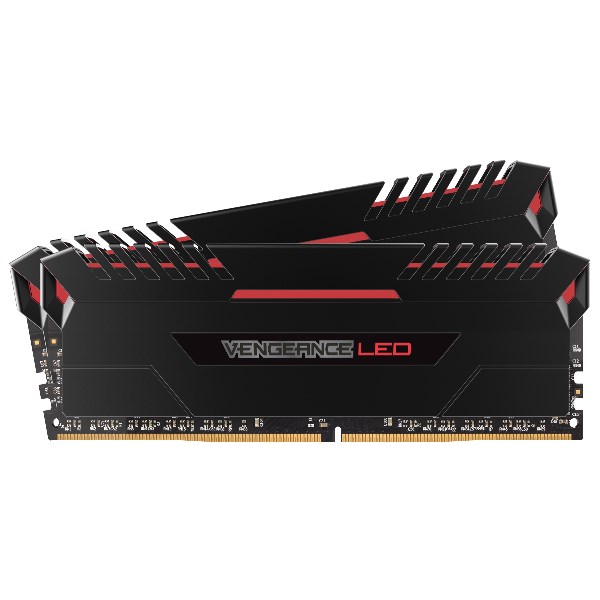
Corsair Vengeance LED 32GB (2 x 16GB) DDR4-3000

Corsair Vengeance LED 32GB (2 x 16GB) DDR4-3000 CMU32GX4M2C3000C15R

Corsair Vengeance LED 32GB (2 x 16GB) DDR4-3000 CMU32GX4M2C3000C15R

Seller Price Buy
Out of Stock
$259.99
+Free shipping
Buy
-
Buy

* Pangoly may earn a commission when you use one of the links to make a purchase. (Disclosure)

* Product prices and availability are subject to change frequently. Any price and availability information displayed on Amazon at the time of purchase will apply.
Price Alert

$

Price alerts are not available for Amazon.

  • LED ILLUMINATED Modules Add Lighting Effect To The System, Enhance Overall System Appearance And Complete The Stylistic Intent Of The Overall System Design
  • Even And Fast Heat Dissipation For High Overclocking Capability, Larger Dissipation Surface Area Increases Thermal Throughput. XMP 2.0 Support For Trouble-Free Automatic Overclocking / Reliability And Peace Of Mind
  • Density: 32GB (4X8gb) / Speed: 3000Mhz / Tested Latency: 15-17-17-35 / Voltage: 1.35V / Format: DIMM / LED: White / Pin Out: 288 Pin / Heatspreader: Anodized Aluminum.
  • Vengeance LED Is Optimized And Compatibility Tested For The Latest Intel X99 And 100 Series Motherboards And Offers Higher Frequencies, Greater Bandwidth, And Lower Power Consumption.
  • If Ddr4 Is Slower, It Uses Looser Latencies Than Ddr3 Does, It Can Be Slightly Slower Than Ddr3 At The Same Clock Speeds, What Makes Ddr4 Important Is That It Can Easily Make Up For That Deficit By Hitting Higher Clock Speeds Than Ddr3 Can. Getting Ddr3 To Run At 2666Mhz Or Higher Requires Very Careful Binning Of Memory Chips And Can Be Very Expensive, While 2666Mhz Is The Lowest Speed We’Re Launching Ddr4 At

Specifications Overview

Model CMU32GX4M2C3000C15R
Type 288-pin DDR4 DIMM
Speed DDR4-3000 MHz
Size 32GB (2 x 16GB)
CAS Latency 15
Timing 15-17-17-35
First Word Latency 10 ns
Voltage 1.35 V
Heat Spreader Yes
ECC Support No

RAM First Word Latency Table (nanoseconds)

Latency is measured in nanoseconds, which is a combination of frequency and CAS. Both frequency increases and latency decreases result in better system performance (when latency is the same, always prefer higher frequency if possible).

Frequency (MT/s)

2133 2400 2666 2800 2933 3000 3200 3300 3333 3400 3466 3600 3666 3733
13 12.19 10.83 9.75 9.29 8.86 8.67 8.13 7.88 7.80 7.65 7.50 7.22 7.09 6.96
14 13.13 11.67 10.50 10.00 9.55 9.33 8.75 8.48 8.40 8.24 8.08 7.78 7.64 7.50
15 14.06 12.50 11.25 10.71 10.23 10.00 9.38 9.09 9.00 8.82 8.66 8.33 8.18 8.04
16 15.00 13.33 12.00 11.43 10.91 10.67 10.00 9.70 9.60 9.41 9.23 8.89 8.73 8.57
17 15.94 14.17 12.75 12.14 11.59 11.33 10.63 10.30 10.20 10.00 9.81 9.44 9.27 9.11
18 16.88 15.00 13.50 12.86 12.27 12.00 11.25 10.91 10.80 10.59 10.39 10.00 9.82 9.64
19 17.82 15.83 14.25 13.57 12.96 12.67 11.88 11.52 11.40 11.18 10.96 10.56 10.37 10.18
20 18.75 16.67 15.00 14.29 13.64 13.33 12.50 12.12 12.00 11.76 11.54 11.11 10.91 10.72
21 19.69 17.50 15.75 15.00 14.32 14.00 13.13 12.73 12.60 12.35 12.12 11.67 11.46 11.25
22 20.63 18.33 16.50 15.71 15.00 14.67 13.75 13.33 13.20 12.94 12.69 12.22 12.00 11.79
23 21.57 19.17 17.25 16.43 15.68 15.33 14.38 13.94 13.80 13.53 13.27 12.78 12.55 12.32
24 22.50 20.00 18.00 17.14 16.37 16.00 15.00 14.55 14.40 14.12 13.85 13.33 13.09 12.86
25 23.44 20.83 18.75 17.86 17.05 16.67 15.63 15.15 15.00 14.71 14.43 13.89 13.64 13.39
CAS (clock cycles) Lower latency means faster memory.

Distribution of First Word Latencies for Similar RAM Modules

The histogram below shows the distribution of first word latencies (in nanoseconds) for all RAM modules of the same DDR type and frequency in our database. Each bar represents the number of modules that fall within a specific latency range. The highlighted bar indicates the latency of the currently selected RAM module.

Cheapest alternatives with equal or better performance

Same latency

Same latency

Same latency


Compare Corsair Vengeance LED 32GB (2 x 16GB) DDR4-3000 with similar Memory

View more comparisons ►

x