Asus ROG Claymore Cherry MX Red

Are you visiting from United States? Go to the United States US site.
ASUS ROG Claymore Cherry MX Red Mechanical Gaming Keyboard

ASUS ROG Claymore Cherry MX Red Mechanical Gaming Keyboard

Venditore Prezzo Compra
-
Compra

* Pangoly potrebbe guadagnare una commissione quando utilizzi uno dei link per effettuare un acquisto. (Disclosure)

* I prezzi dei prodotti e la disponibilità sono soggetti a modifiche frequenti. Verranno applicate tutte le informazioni su prezzi e disponibilità visualizzate su Amazon al momento dell'acquisto.
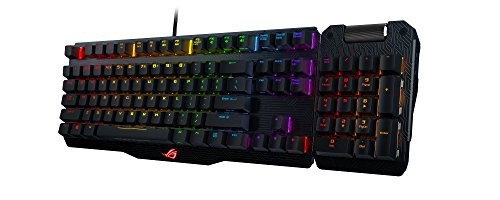
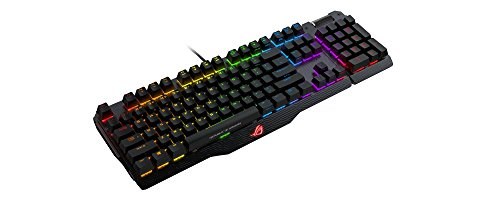
  • ASUS Aura ROG Sync for a customizable light-show with the growing ASUS Aura ecosystem including mouse, motherboard and graphics card via ROG Armoury's 14 lighting effects
  • Cherry MX RGB switches for faster response times and extended keyboard life cycle
  • Detachable numeric keypad attaches to left for macros or right for 10-key usage
  • One-click overclocking, profile-switching, boot-up and fan control through programmed hot keys
  • Aluminum-alloy frame for enhanced durability and keypad stability
Asus ROG Claymore Cherry MX Red image 1
Asus ROG Claymore Cherry MX Red image 2
Asus ROG Claymore Cherry MX Red image 3
Asus ROG Claymore Cherry MX Red image 4
Asus ROG Claymore Cherry MX Red image 5
Asus ROG Claymore Cherry MX Red image 6
Asus ROG Claymore Cherry MX Red thumbnail 1
Asus ROG Claymore Cherry MX Red thumbnail 2
Asus ROG Claymore Cherry MX Red thumbnail 3
Asus ROG Claymore Cherry MX Red thumbnail 4
Asus ROG Claymore Cherry MX Red thumbnail 5
Asus ROG Claymore Cherry MX Red thumbnail 6

Info

Modello ROG Claymore Cherry MX Red

Descrizione

  • Connectivity Technology

    Wired, USB 2.0

  • OS Support

    Windows® 10
    Windows® 7

  • Dimensions

    450 x 140 x 45 mm

  • Weight

    943 g with cable

  • Contents

    1 x Claymore keyboard 80%
    1 x Claymore keyboard 20% (numerical keypad)
    1 x USB cable
    2 x ROG pouches
    2 x ROG logo stickers
    User documentation

  • Note

    [Hot Keys]

    Profile switch:
    Fn + 1/ 2 / 3/ 4/ 5/ 6: Profile 1 - 6 (6 is default profile)

    Lighting effects switch:
    Fn + Right or Fn + Left

    Brightness level:
    Fn + Up: Brightness up (5 levels)
    Fn + Down: Brightness down (5 levels)

    Color customization:
    Fn + Delete: Red increase (10 levels)
    Fn + End: Green increase (10 levels)
    Fn + PageDown: Blue increase (10 levels)

    ROG SYNC (sync Aura lighting effects between Claymore and Aura-enabled mouse):
    Fn + PrintScreen
    *Only available when Armoury software is activated.
    *Synchronization will take about 10 seconds.

    Motherboard fan speed control:
    Fn + "+" or Fn + "-"
    *Only available when Fan Xpert software and Armoury software are activated.

    On-the-fly macro recording:
    Step 1: Fn + Right-ALT to start recording
    Step 2: Fn + Right-ALT to end recording
    Step 3: assign Macro Key

    Windows key lock:
    Fn + Windows key
    *Not available under Armoury software Claymore lighting page.

    Repeat acceleration:
    Fn + F1: 1X
    Fn + F2: 2X
    Fn + F3: 3X
    Fn + F4: 4X

    Overclocking & Booting-up Hot Keys (ROG KeyBot II S5 mode)
    Boot-up: Long press on ENTER
    Boot-up and overclock CPU: Long press F11
    Boot-up and overclock memory: Long press F12
    Boot-up and enter BIOS: Long press DELETE
    Clear CMOS: C + L + R
    *Please plug keyboard to the dedicated USB socket found on your ROG motherboard.
    *Only available when KeyBot II software is activated and switched on.


Confronta Asus ROG Claymore Cherry MX Red con Tastiere simili

Guarda altri confronti ►

x